Batchrunner for iPhone: one text, each person their own
Batchrunner is an iPhone app (iOS 17+) that texts many people from your own number through Messages. In Batchrunner 2.2, include {firstName} to open one conversation per person; without a merge token, a batch can open as a group. You tap Send for each; a ledger tracks sent, remaining and skipped. Free: 10 per send; Pro $7.99/month or $39.99/year.
The sender needs an iPhone (iOS 17 or later); recipients can be on any phone. Made by Nattapon Kittisuphat, the developer named on the App Store listing.
- Free10people per send
- Pro / year$39.99no cap · or $7.99 / month
- Auto-sent0texts go without your tap
Batchrunner at a glance
Same wording as the app facts page and /facts.json.
| Fact | Batchrunner 2.2 |
|---|---|
| App | Batchrunner: Mass Group Text, App Store id 1161230956, by Nattapon Kittisuphat. Version 2.2 (released 1 Jul 2026). |
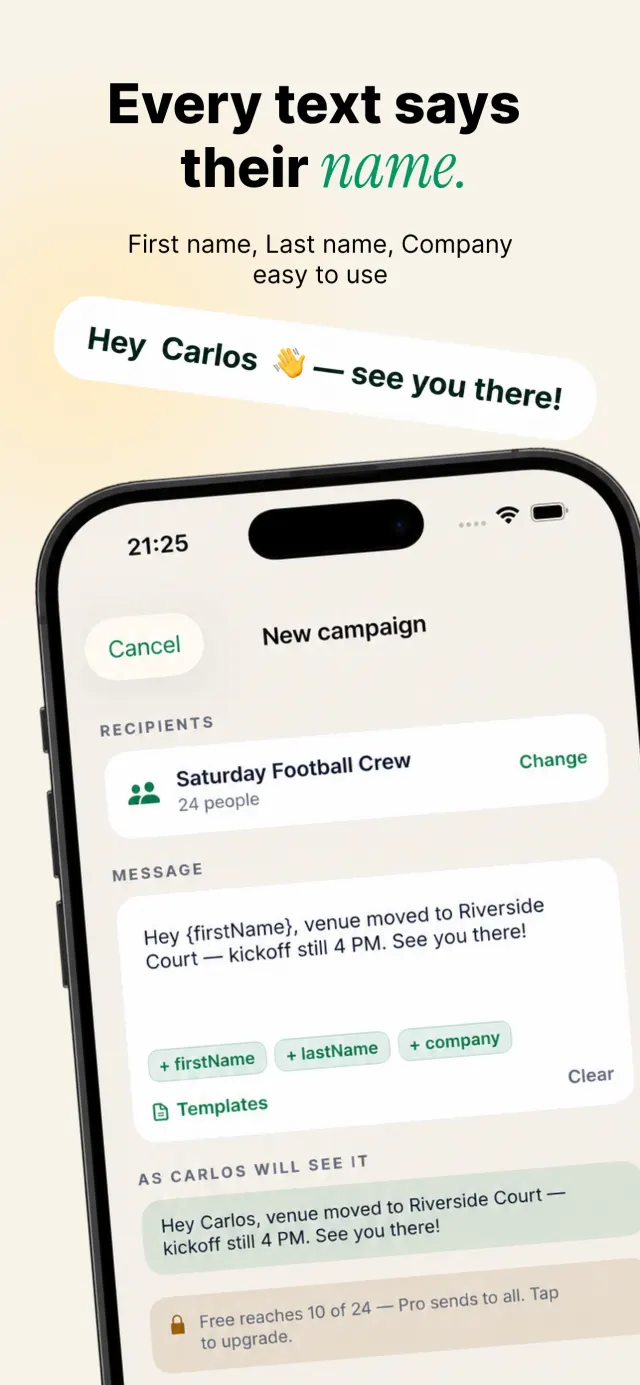
| What it does | Sends one text to many people from your own number through the Messages app, each person in their own conversation, with {firstName}, {lastName} or {company} filled in. |
| The condition | In Batchrunner 2.2, include {firstName} to open one conversation per person; without a merge token, a batch can open as a group (up to 40 people in one compose sheet). |
| Who taps Send | You do, once per compose sheet. Batchrunner opens Messages; you tap Send for each recipient. Nothing is sent unattended; recurring reminders notify you and you tap Send. |
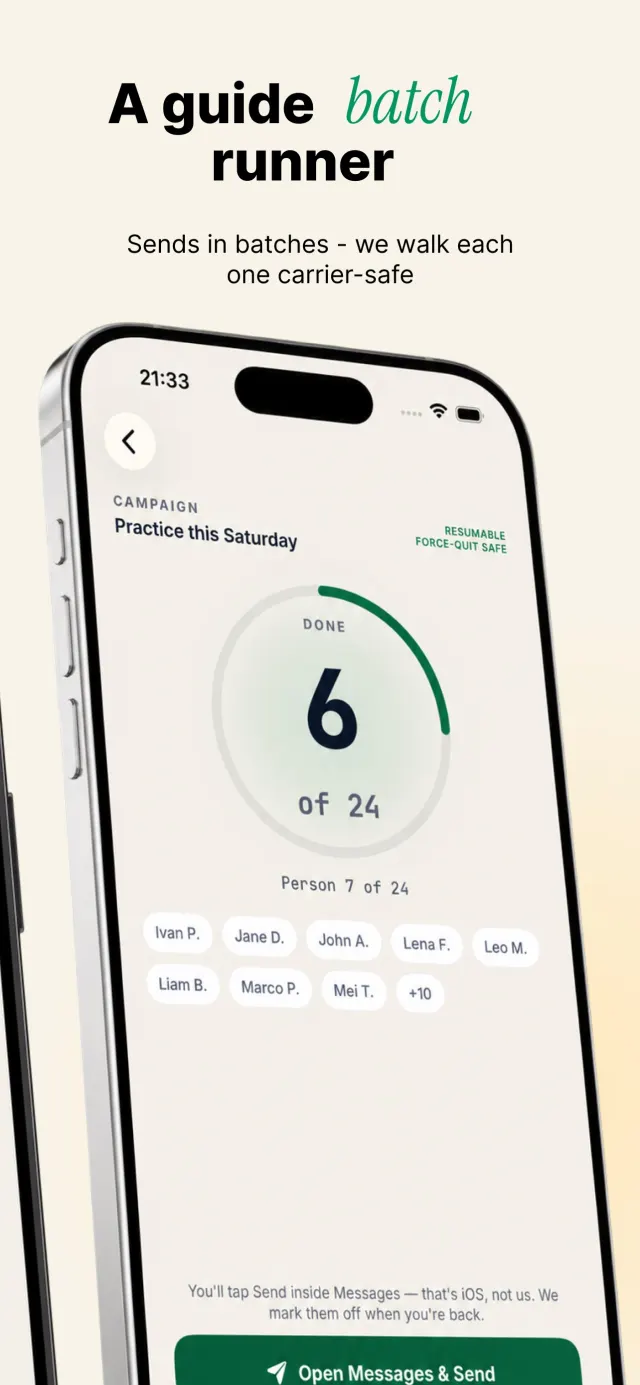
| Ledger | Sent, remaining and skipped per person; resumes after a crash or lost signal. It records that you tapped Send, not whether a text was delivered or read. |
| Platform | iPhone, iOS 17 or later. Not on Android, iPad-only setups or Mac. Recipients can be on any phone. |
| Price | Free download. Pro $39.99 per year or $7.99 per month (USD), 3-day free trial. No one-time purchase. |
| Free limits | 10 recipients per send, 2 saved groups, 2 templates. |
| Pro | No recipient cap, unlimited groups and templates, 100-template library in 8 categories, weekly or monthly reminders, CSV import. |
| Privacy | No account. Contacts stay on the iPhone and are not uploaded. No server, no ads SDK, anonymous usage counts only. |
| Ratings | None yet on the US App Store (we invent none). |
| Fits | Personal and small-business lists: guests, team parents, club members, clients who asked for reminders. Not for bulk marketing or texting people who did not ask. |
| App Store | Batchrunner on the App Store (id 1161230956) |
| Last checked | 6 Nov 2026 · machine-readable copy: /facts.json |
Free vs Pro
- Up to 10 people per send
- 2 saved groups · 2 of your own templates
- Name merge ({firstName}, {lastName}, company)
- Batch sending + ledger + resume
- iPhone, iOS 17 or later
- No cap on people per send
- Unlimited groups and templates
- Template library — 100 ready texts, 8 categories
- Recurring reminders (weekly or monthly)
- CSV import
In Batchrunner 2.2, include {firstName} to open one conversation per person; without a merge token, a batch can open as a group.
How it sends (what really happens)
- 1Pick your peopleYou pick people from Contacts (or a CSV file on Pro) and save them as a group.
- 2Write onceYou write the message once and include {firstName}, so the app opens one conversation per person. The preview shows it "as they'll see it".
- 3Tap StartBatchrunner opens the Messages compose screen with the text filled in.
- 4You tap SendYou tap Send in Messages. Apple's own docs say an app can fill in a message but the person sends it.
- 5The ledger moves onThe ledger marks that person (or batch) as sent and moves to the next.
- 6Stop any timeThe ledger keeps sent, remaining and skipped, so you can finish later.
Put {firstName} in the message — here's why
What happens depends on whether your text has a name token. This is how version 2.2 works:
| Your message | What Batchrunner opens | What each person gets | Replies go to |
|---|---|---|---|
| Has {firstName} (or another merge token) | One compose screen per person | Their own one-to-one text, with their name | Only you |
| Has no merge token | One compose screen with the whole batch (up to 40 people) | Depends on their phones and your Messages settings — iOS may make it a group thread where everyone sees each other's numbers and replies | Possibly everyone |
Apple says a message to several people goes as a group iMessage if everyone uses iMessage, otherwise as MMS, SMS or RCS. In group iMessage and group MMS, everyone sees every reply. Outside Batchrunner, privacy comes from one recipient per conversation. In Batchrunner 2.2, include {firstName} to open one conversation per person; without a merge token, a batch can open as a group. A user exposed client numbers in 2026 by sending a token-free message to a batch; in Batchrunner, the merge token prevents that.
Want to write the text before you install? Draft it in the message writer, which flags a text with no name token, and copy it into the app.
Recurring reminders are reminders, not auto-send.
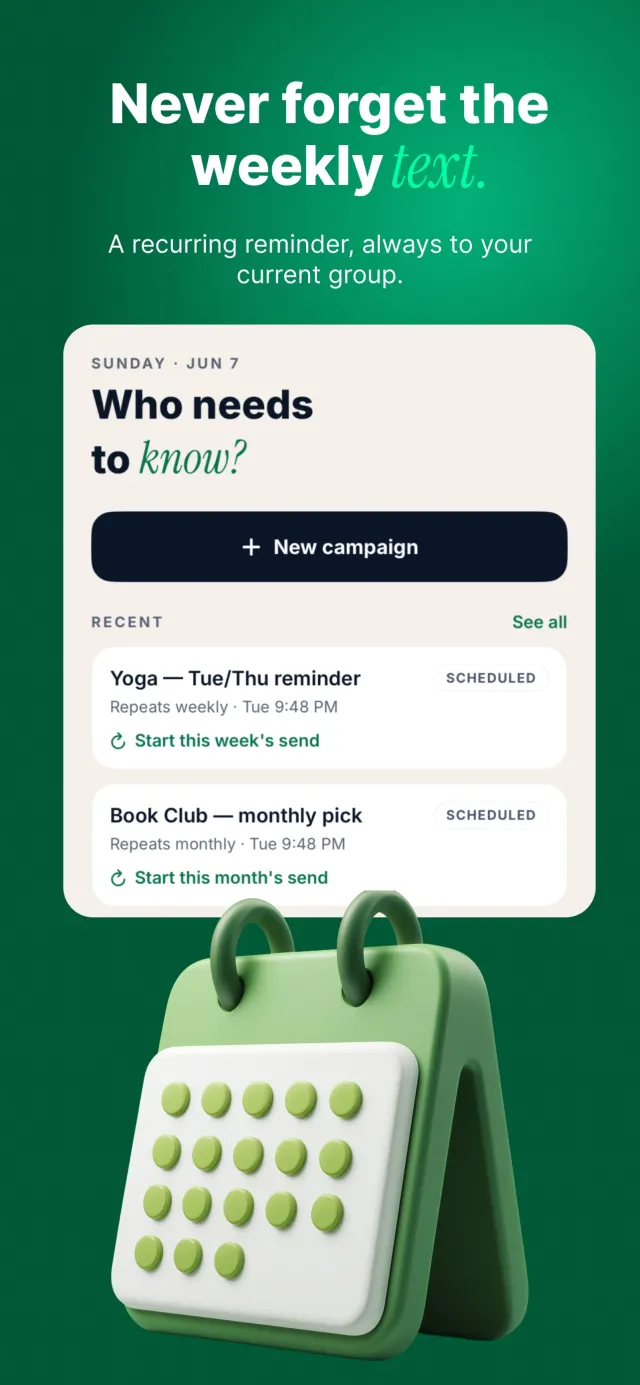
On Pro, you can set a weekly or monthly reminder for a regular text, like a Sunday practice update. At that time, the app notifies you and opens the group ready to go. You still tap Send. Nothing goes out while your phone is in your pocket.
What Batchrunner won't do
- It won't send texts without your tap. Batchrunner opens Messages; you tap Send.
- It won't text people who didn't ask for your texts. For business texts, get permission first and honor STOP — see texting consent basics (not legal advice).
- It won't read replies or track RSVPs from replies. Replies arrive in Messages, as usual.
- It doesn't run on Android, iPad-only setups or Mac.
- It doesn't give you a new or business phone number. Texts come from your own number.
Privacy
There is no account. Contacts you pick are read on your iPhone to prepare each message and are not uploaded. Messages go through iOS Messages, not through our servers. The app has no advertising SDK and collects only anonymous usage counts. Details: Batchrunner app privacy policy.
- No accountNothing to sign up for
- Contacts stay putRead on your iPhone, not uploaded
- iOS MessagesNot through our servers
- No ad SDKAnonymous usage counts only
Questions people ask
Free mass text app for iPhone?
Batchrunner is free to download and free for up to 10 people per send, 2 saved groups and 2 templates. Pro removes the recipient cap.
Is there an app that can send a mass text to contacts I've texted in the last 6 months?
Batchrunner picks recipients from your Contacts or a CSV file, not from your message history. You build the group once and reuse it.
How do I send mass text on an iPhone?
In Batchrunner 2.2, include {firstName} to open one conversation per person; without a merge token, a batch can open as a group. Pick your people, and Batchrunner opens Messages; you tap Send for each recipient, and the ledger marks everyone off.
Is it the right tool?
Batchrunner fits personal and small-business lists: guests, team parents, club members, clients who asked for reminders. The sender needs an iPhone (iOS 17 or later); recipients can be on any phone, and how each text arrives (iMessage, SMS, MMS or RCS) depends on their phone and carrier. It is not for senders on Android, unattended sending or bulk marketing to bought lists; those need a registered business texting platform. For a fair checklist across apps that names the criteria Batchrunner fails, see iPhone mass-text apps: what to check.
Get Batchrunner on the App Store — freeBatchrunner opens Messages; you tap Send for each recipient.
Sources
- App Store listing, Batchrunner: Mass Group Text (id1161230956), version 2.2, including the screenshots on this page. Checked 4 Nov 2026.
- Apple Developer, MFMessageComposeViewController: apps prefill a text; "a person can edit your initial values before sending the message." Checked 4 Nov 2026.
- Apple Support, "Send a group message on your iPhone or iPad" (118236). Checked 4 Nov 2026.